Skip to content Skip to footer

Title: How to Install Nomad IPTV on Amazon Firestick 2026

How to Install Nomad IPTV on Amazon Firestick 2026 | Step-by-Step Guide
๐Ÿ“บ Step-by-Step Guide ยท 2026

How to Install Nomad IPTV
on Amazon Firestick

Follow this simple guide to get Nomad IPTV running on your Amazon Firestick in under 10 minutes โ€” no technical skills required.

How to Install Nomad IPTV on Amazon Firestick 2026
โฑ๏ธ
10 Minutes Setup Time
๐Ÿ“ถ
Wi-Fi Required
โœ…
5 Easy Steps
๐Ÿ”ฅ
All Firestick Models Supported
Installing Nomad IPTV on your Amazon Firestick is a great way to enjoy streaming content directly on your TV. The process is straightforward and involves downloading an IPTV app that supports the Nomad IPTV service, then entering your subscription details. Follow the steps below to get started.
1
Step One
Install Downloader App

The Downloader app allows you to download apps not available on the Amazon App Store. Follow these steps to install it:

1
Go back to the home screen and select the Search icon at the top.
Firestick home screen search icon
๐Ÿ” Select the Search icon on your Firestick home screen
2
Type in Downloader and search for it.
Search Downloader on Firestick
โŒจ๏ธ Type "Downloader" in the search bar
3
Find the Downloader app, select it, and click on Download to install it.
Download and install Downloader app on Firestick
โฌ‡๏ธ Select Download to install the Downloader app
2
Step Two
Allow Apps from Unknown Sources

Before you can install third-party apps on your Firestick, you need to allow apps from unknown sources:
1
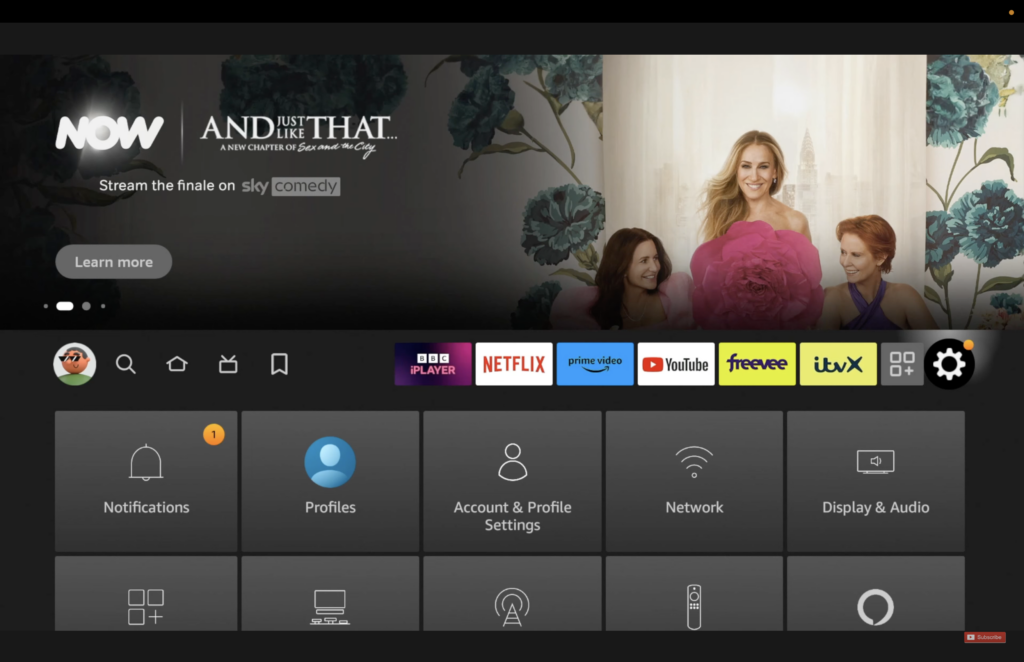
Navigate to Settings on your Firestick home screen.
Amazon Firestick Settings
โš™๏ธ Go to Settings on your Firestick
2
Select My Fire TV (or Device on some older models).
My Fire TV option in settings
๐Ÿ“บ Select "My Fire TV" from Settings
3
Choose Developer Options.
Developer Options on Firestick
๐Ÿ› ๏ธ Open Developer Options
4
Turn on ADB Debugging and Apps from Unknown Sources.
Enable unknown sources on Firestick
โœ… Enable ADB Debugging and Apps from Unknown Sources
3
Step Three
Download Nomad IPTV Player

With Downloader installed, you can now download the Nomad IPTV player app directly onto your Firestick:

1
Open the Downloader app on your Firestick.
Open Downloader app on Firestick
๐Ÿ“‚ Open the Downloader app
2
In the URL field, type link which is provided to you through the email or chat and press Go to download the Nomad IPTV app on your device.
Enter Nomad IPTV APK URL in Downloader
๐Ÿ”— Enter the Nomad IPTV download URL
3
Follow the on-screen instructions to download and install the app. Accept any prompts that appear.
Accept Nomad IPTV installation terms
โœ… Accept terms and complete the installation
4
Step Four
Enter Your Subscription Details

After installing the Nomad IPTV app, open it on your Firestick. You will be prompted to enter your subscription credentials โ€” these were provided to you when you subscribed to Nomad IPTV.

Your Login Credentials
Username
Provided in your email
Password
Provided in your email
Portal URL
http://nomadiptv.online:25461
5
Step Five
Start Streaming!

Once you've entered your subscription details you're all set! The Nomad IPTV app will load all your content instantly.

  • The app will load all available Live TV channels, VOD, and series
  • Browse through 23K+ channels including sports, news, movies and international content
  • Enjoy 4K and HD quality streaming with zero buffering
  • Use the EPG (Electronic Program Guide) to see what's on
๐Ÿ’ก
Tips for a Smooth Streaming Experience
Ensure your Firestick is connected to a stable and strong Wi-Fi network to avoid any buffering issues during playback.
Regularly update the Nomad IPTV player app to access new features, channels, and performance improvements.
If you encounter any issues, try restarting your Firestick or reinstalling the IPTV player app โ€” this resolves 90% of problems.
For the best 4K experience, make sure your internet speed is at least 25 Mbps and your TV supports 4K output.

Need Help? We've Got You

If you need further assistance installing Nomad IPTV app on your Firestick, our 24/7 support team is ready to help you get streaming in minutes.

๐Ÿ’ฌ Contact Support